
-
Home

-
Products
-
Adhesives
-
Epoxy Adhesives
- 3M Adhesive Mix Monitor
3M Adhesive Mix Monitor
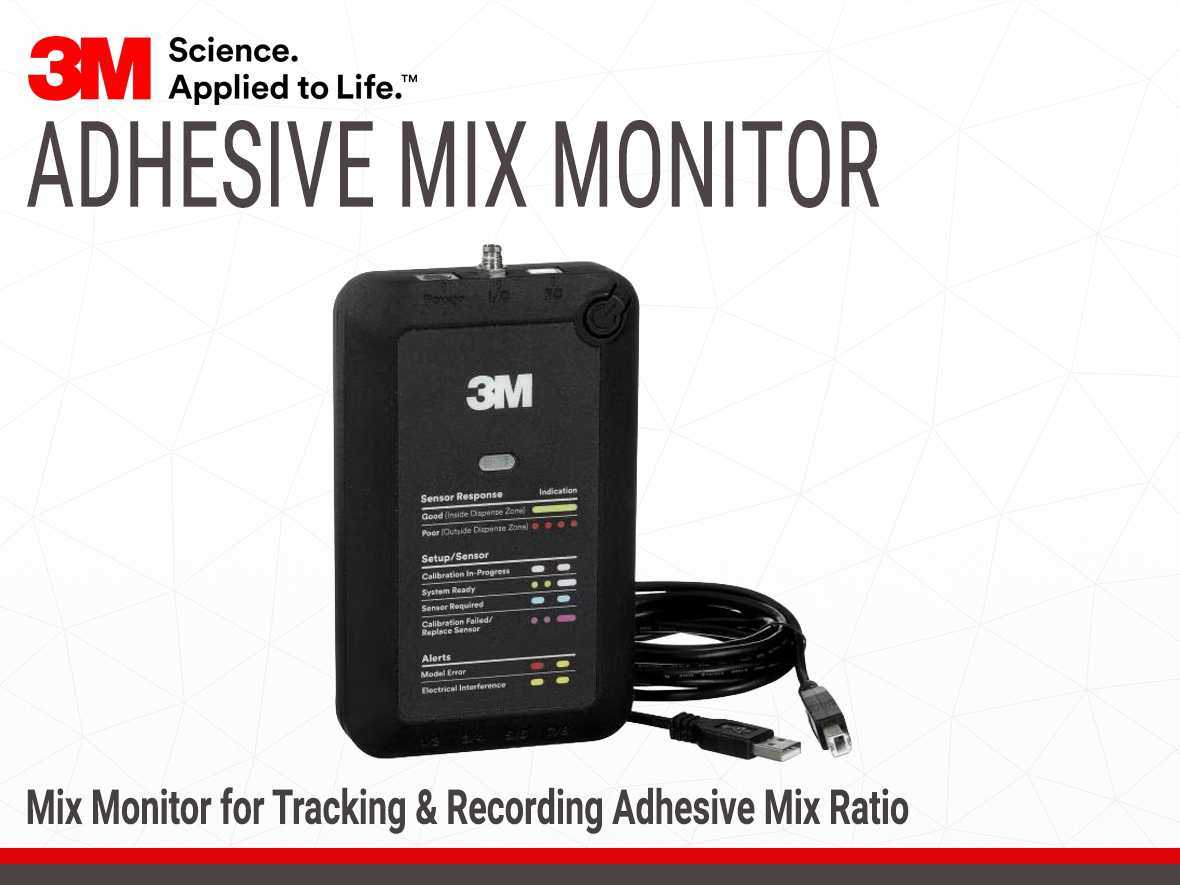

- Real-Time In-Line Monitoring for Two-Part Adhesive Dispensing
- Reduce Bond Failure Risk from Improperly Mixed Two-Part Adhesives
- Minimize Adhesive Waste from Unnecessary Purging
Product Description
The 3M™ Adhesive Mix Monitor system is an in-line adhesive quality monitoring solution that measures two-part adhesive properties after mixing and before dispensing. It continuously monitors mix ratio, temperature, and degree of cure in real time to verify that the adhesive meets its intended specifications before application.
The system consists of three core components: a disposable in-line sensor in direct contact with the mixed adhesive, an amplifier/reader that captures and conditions the signal, and a processing unit that compares the measured data to the adhesive’s reference profile. This data can be streamed directly to a programmable logic controller (PLC), enabling smart, closed-loop control of the dispensing process.
Key Features:
- In-line verification before dispensing
- Real-time monitoring of critical adhesive properties
- Closed-loop PLC integration for process control
- Compact footprint with easy system integration
- Simple visual pass/fail status for operators
- Compatible with a wide range of 3M™ two-part adhesives
Real-time feedback allows operators to purge only when necessary, minimizing adhesive waste and unnecessary downtime. By identifying two-part adhesive mix quality issues before dispensing, the system helps reduce rework, scrap, and the risk of latent bond failures in production. These benefits make the system well-suited for a wide range of adhesive dispensing applications.
Typical Applications:
- In-line monitoring for automated adhesive dispensing in automotive assembly
- Mix quality verification in aerospace bonding processes
- Process monitoring for electronics potting and encapsulation
- In-process quality control for sealant application in consumer products
- Adhesive mix verification for composite panel bonding
Technical Specifications
Additional Information
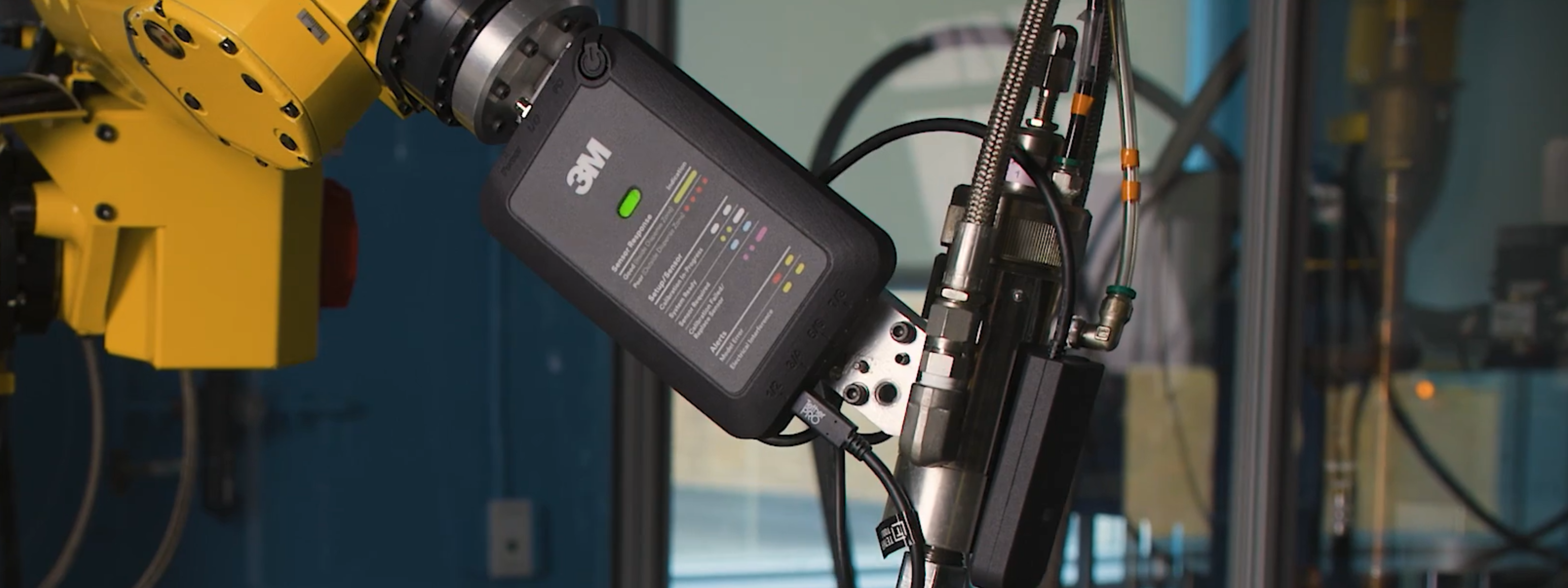
Verify Adhesive Mix Quality Before Application
Improve process reliability without changing your dispensing setup.
The 3M™ Adhesive Mix Monitor improves two-part adhesive dispensing by providing real-time visibility into adhesive mix quality at the point of dispense. This enables earlier detection of mix ratio and cure issues, helping reduce scrap, rework, and bond failures.
Reduce adhesive waste caused by unnecessary purging
In two-part adhesive dispensing, operators often purge conservatively because mix quality cannot be verified in real time, leading to excess material waste and downtime. In-process monitoring allows purging only when mix quality is out of specification, reducing adhesive waste and improving uptime.
Reduce rework by detecting mix quality issues before dispensing
Mix issues that are detected only after application typically require rework or scrapping of parts. Identifying adhesive mix quality problems before dispensing prevents defects from propagating downstream in the production process.
Improve dispensing consistency across operators and shifts
Two-part adhesive dispensing can feel like a “black box” to operators, leading to inconsistent practices and variable outcomes. Clear, in-process mix quality feedback improves process consistency across shifts, operators, and production lines.
Reduce bond failure risk from two-part adhesive mix errors
Improper mix ratio or incomplete cure in two-part adhesive dispensing can lead to latent bond failures that are only discovered after assembly or in the field. In-line, real-time monitoring of adhesive mix quality at the point of dispense helps identify mix errors before the adhesive reaches the part.
Enable part-level traceability of adhesive mix quality
Many manufacturing teams lack a way to link adhesive mix quality data to individual parts, making root-cause analysis difficult when failures occur. Time-stamped, in-process adhesive monitoring enables traceability of mix quality for quality control, audits, and failure investigations.
Support closed-loop control in automated adhesive dispensing systems
Without real-time process data, adhesive dispensing systems operate open-loop, making it difficult to correct process drift. Streaming adhesive mix quality data to a PLC enables closed-loop process control, alarms, and automated responses to out-of-spec conditions.
3M™ Adhesive Mix Monitor System Components
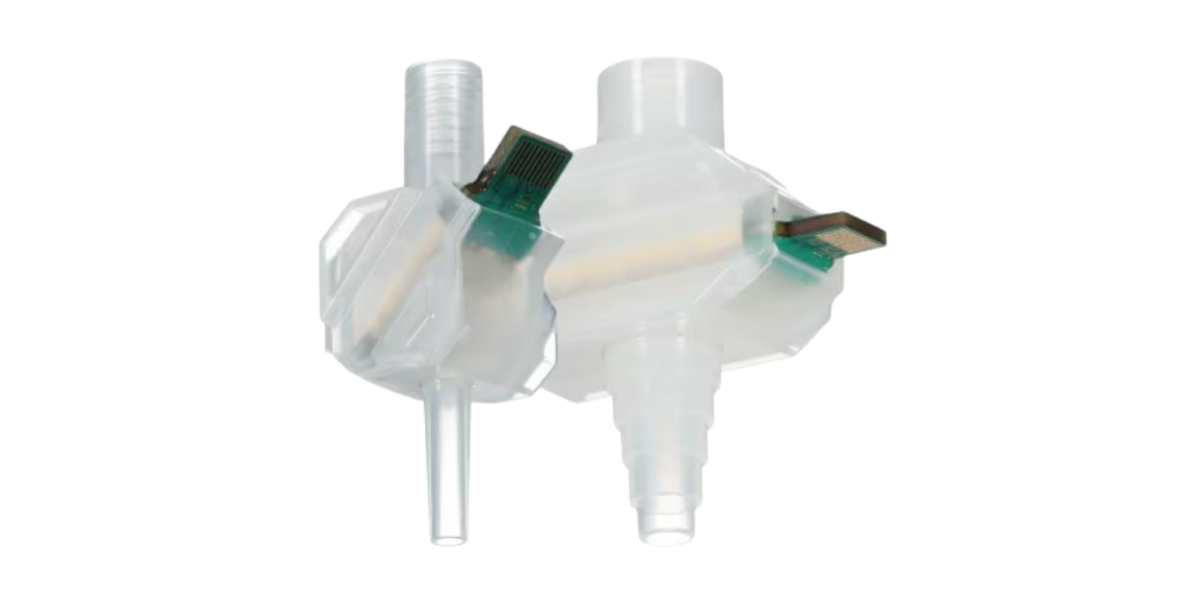
Sensor
Disposable in-line sensing element for real-time adhesive mix quality measurement
The 3M™ Adhesive Mix Sensor is a disposable, in-line sensing element that interfaces directly with the mixed adhesive stream. It provides the primary measurement input used by the system to assess adhesive mix quality, and is designed for easy replacement as part of routine maintenance and changeovers. The sensor is available in Standard Volume and Low Volume variants to accommodate different dispensing volumes, supplied in cases of 72 sensors.
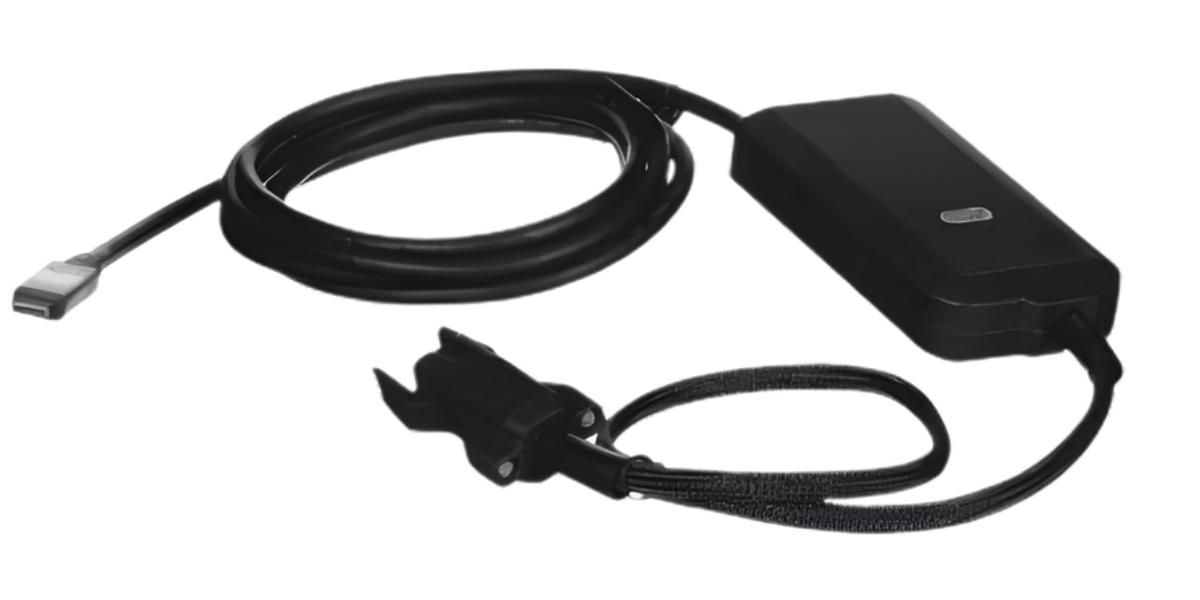
Amplifier / Reader
Signal conditioning and data interface between the sensor and processing unit
The 3M™ Adhesive Mix Monitor Amplifier/Reader interfaces with the disposable sensor to capture and condition the raw measurement signal generated during adhesive mixing. It converts the sensor output into a stable, usable signal for the processing unit, ensuring consistent data quality for downstream analysis and control.
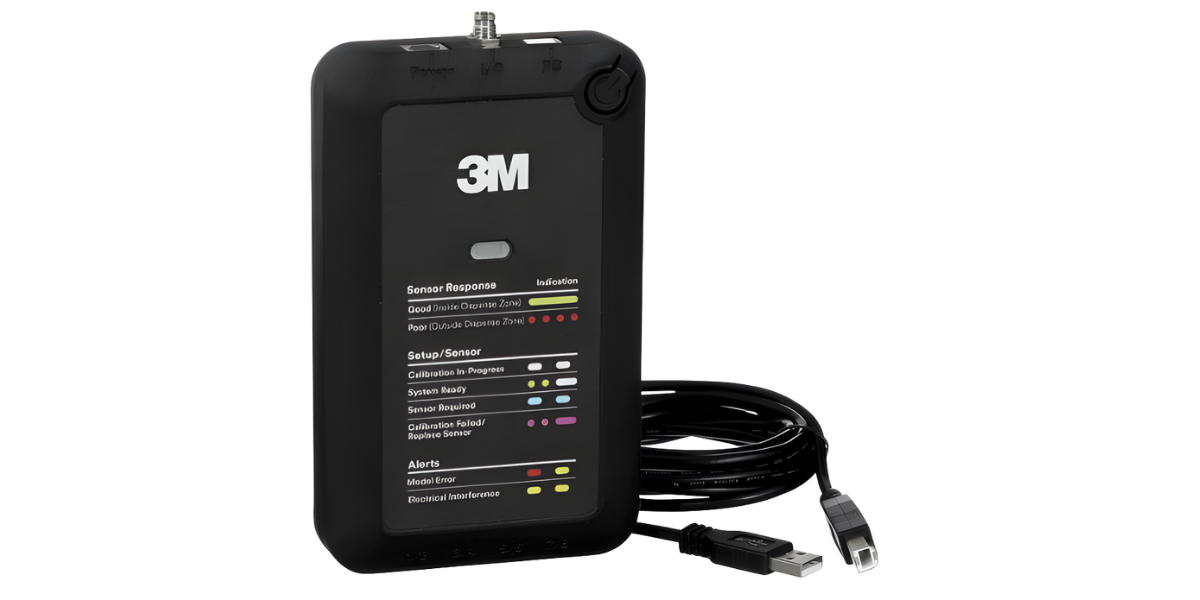
Processing Unit
Mix quality evaluation, decision logic, and system-level outputs
The 3M™ Adhesive Mix Monitor Processing Unit receives conditioned measurement data from the amplifier/reader and evaluates it against the adhesive’s reference profile. It applies defined acceptance limits to determine mix quality status and provides the system’s decision logic for downstream control, alarms, and process integration.
Auxiliary Accessories
Optional accessories for system integration and regional power compatibility of the 3M™ Adhesive Mix Monitor.
Power Cords (Regional Plug Types)
- 120V Type B (1 each / case)
- 220V Type A (1 each / case)
- 250V Type C (1 each / case)
- 230V Type G (1 each / case)
- 100V Type B (1 each / case)
- 220V Type C (1 each / case)
Communication & Interface Cables
- USB-B cable for streaming data from the processing unit
- SDCI communication cable per IEC 61131-9
System Requirements and Operating Conditions
System Requirements
- A power outlet within 2.0 meters of the dispensing station
- A Windows-based computer with an Internet connection is required to download the System Manager and Adhesive Mix Model. The Adhesive Mix Model is loaded onto the processing unit using the System Manager and included USB cable. No Internet connection is required to load the model or operate the system.
Power Supply
Input: 100–240 VAC, 50–60 Hz
Output: 28.1 W max, +5 V (2.5 A); +12.0 V (1.0 A); −12.0 V (0.3 A)
System Operation and Maintenance Considerations
- Operate the system between 15 °C (59°F) and 35 °C (95°F), and at relative humidity between 5% and 85%.
- Keep system components dry and free of contamination.
- Do not expose electrical leads directly to water, solvents, or other chemicals.
- Before each use, inspect all parts to ensure there are no frayed wires. If wires are frayed, do not use the system.
- If adhesive or other contaminants are found on surfaces, wipe clean with a dry, lint-free cloth.
- If contaminants are present on electrical contacts (e.g., reader/amplifier) and cannot be removed, replace the affected part.
Setting Up the 3M™ Adhesive Mix Monitor
Follow these step-by-step instructions to install the System Manager software, update firmware, load the adhesive mix model, and configure operating limits for your two-part adhesive dispensing system.
Before you begin: Make sure the Processing Unit is powered ON and connected to your PC using the supplied USB cable via the port labeled PC.
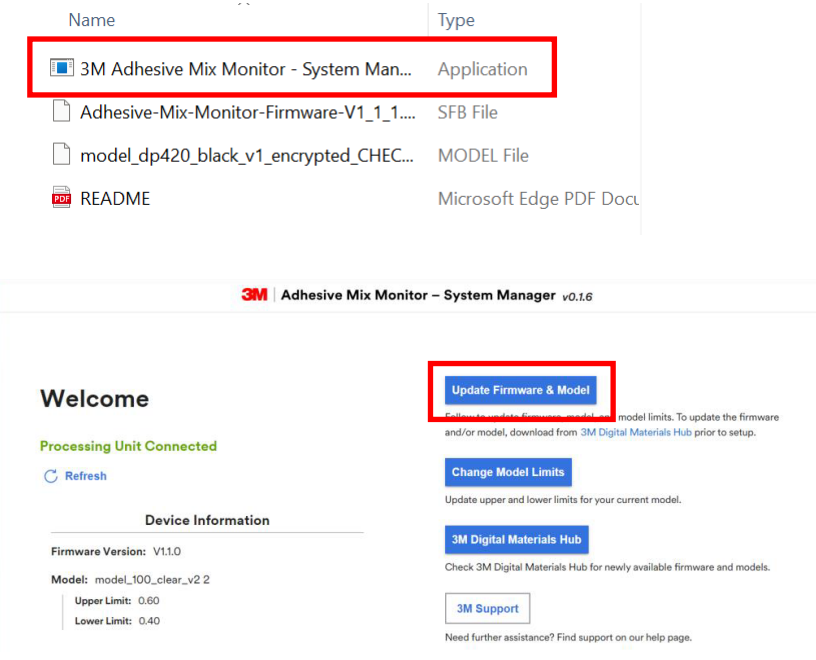
Step 1: Install and Launch the System Manager Application
Install the 3M™ Adhesive Mix Monitor System Manager application. Once the application opens, navigate to Update Firmware & Model to begin configuring the system for your specific adhesive and sensor setup.
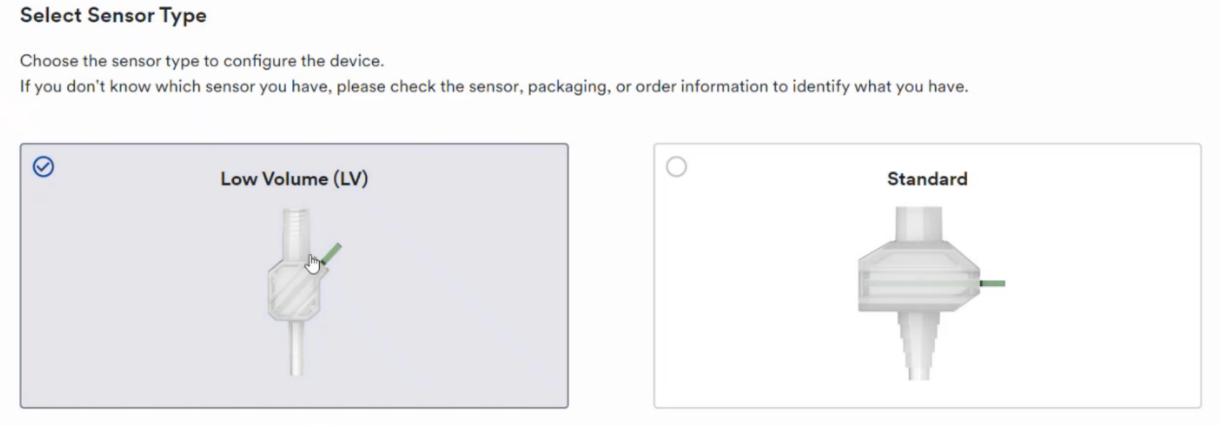
Step 2: Select the Sensor Used in Your Application
Select the appropriate sensor type used in your dispensing system (e.g., Standard Volume or Low Volume). This ensures the system correctly interprets the adhesive mix signal for your specific flow range.
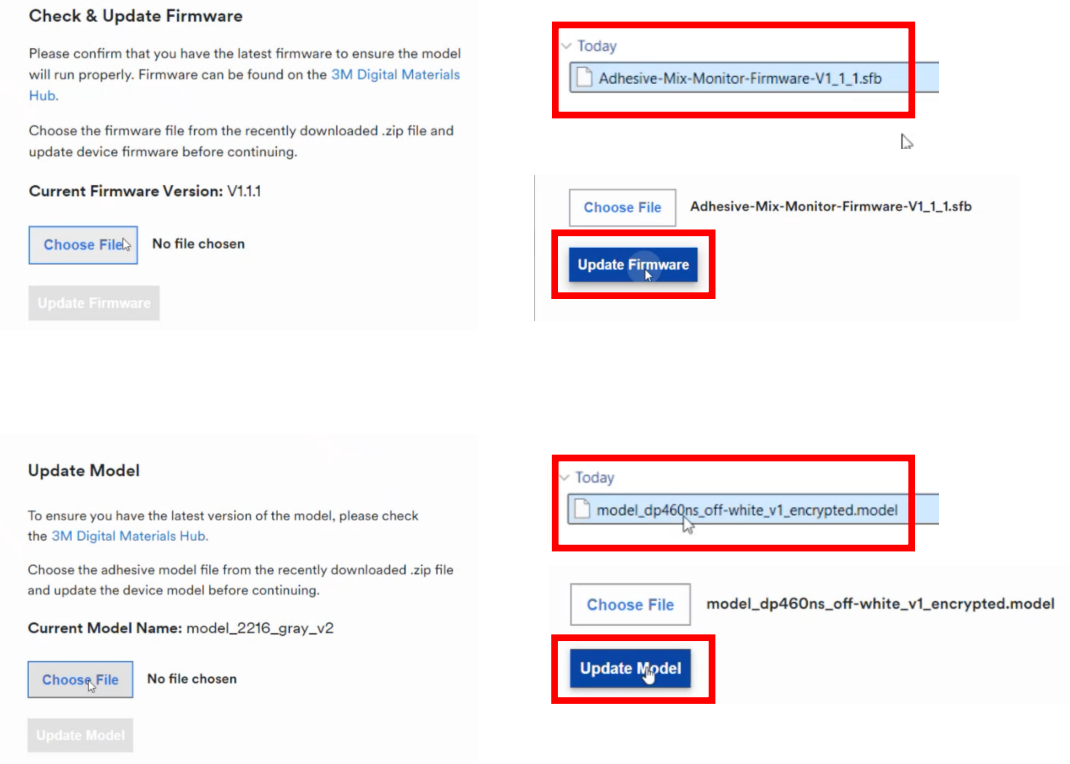
Step 3: Update Firmware and Upload the Adhesive Mix Model
Update the firmware by selecting the appropriate .sfb file from the folder. Upload the adhesive mix model by selecting the corresponding .model file. This loads the reference profile used to evaluate mix quality in real time.
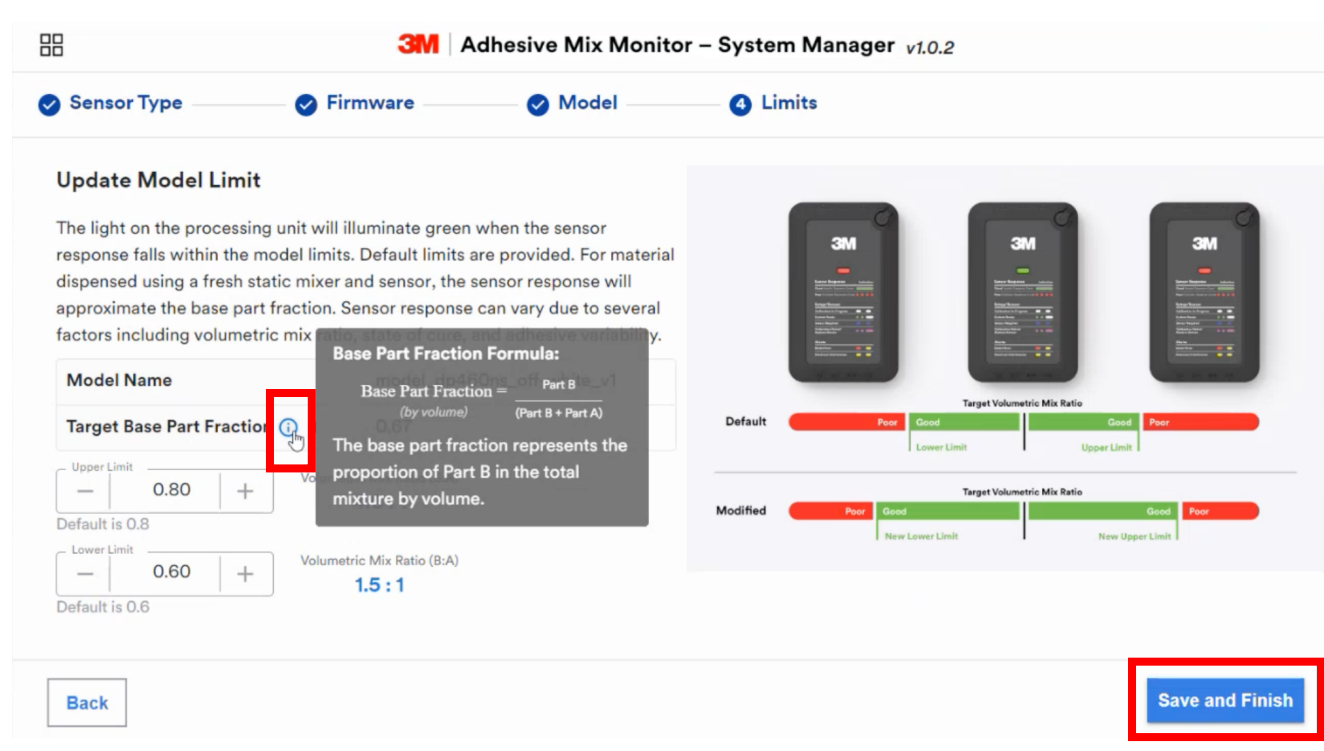
Step 4: Verify Model Limits and Save Configuration
Verify that the Model Limits match your application requirements. Default limits will auto-populate. Use the + and − controls to adjust thresholds as needed, then click Save and Finish to complete system configuration.
Installation and Assembly of the 3M™ Adhesive Mix Monitor
Follow these steps to install and assemble the 3M™ Adhesive Mix Monitor components into your two-part adhesive dispensing system. Proper installation ensures accurate mix quality monitoring and prevents leaks or connection issues during operation.
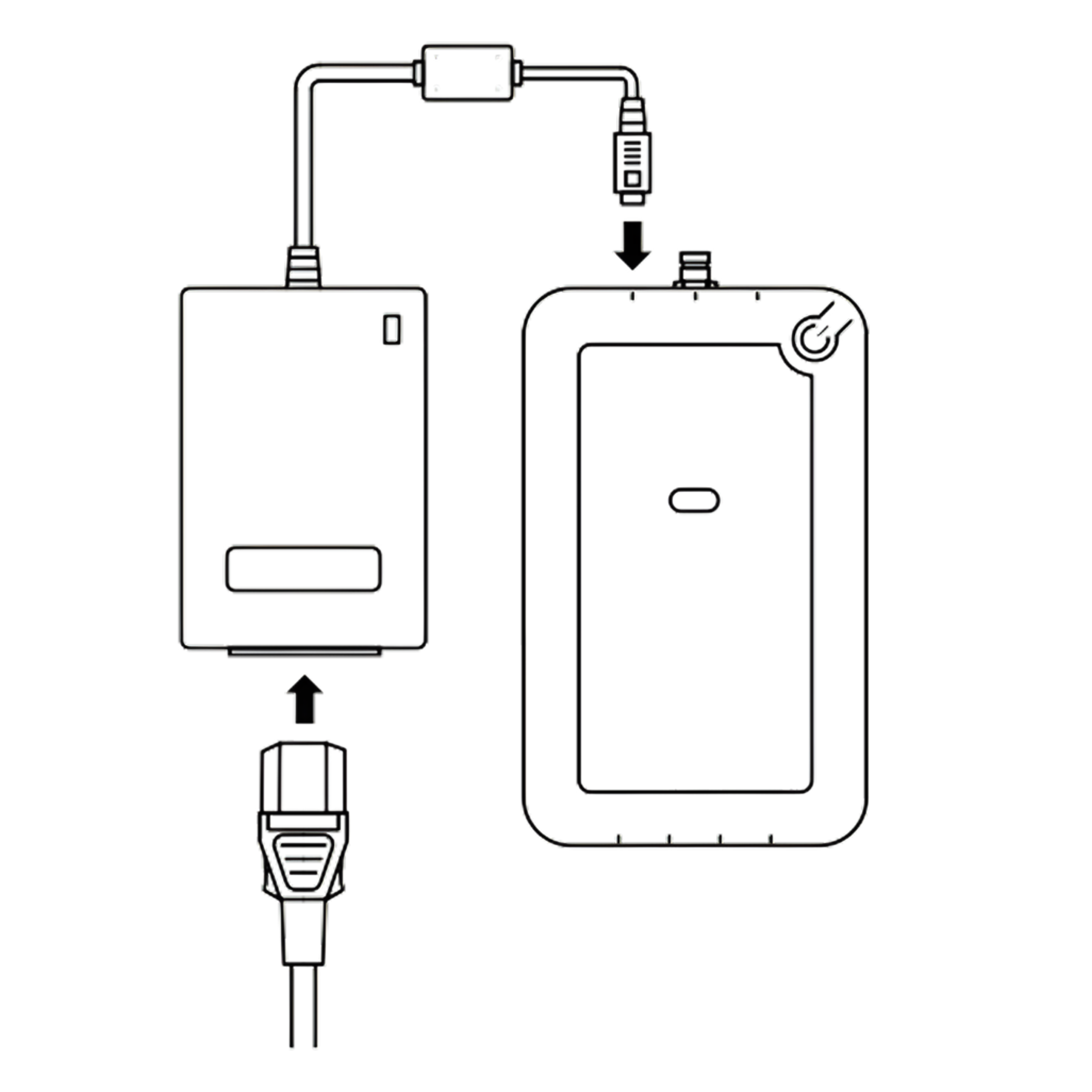
Step 1: Connect the Processing Unit to the Power Supply
Attach the power supply to the 3M™ Adhesive Mix Monitor processing unit. Attach the power cord to the power supply and connect it to a power outlet.
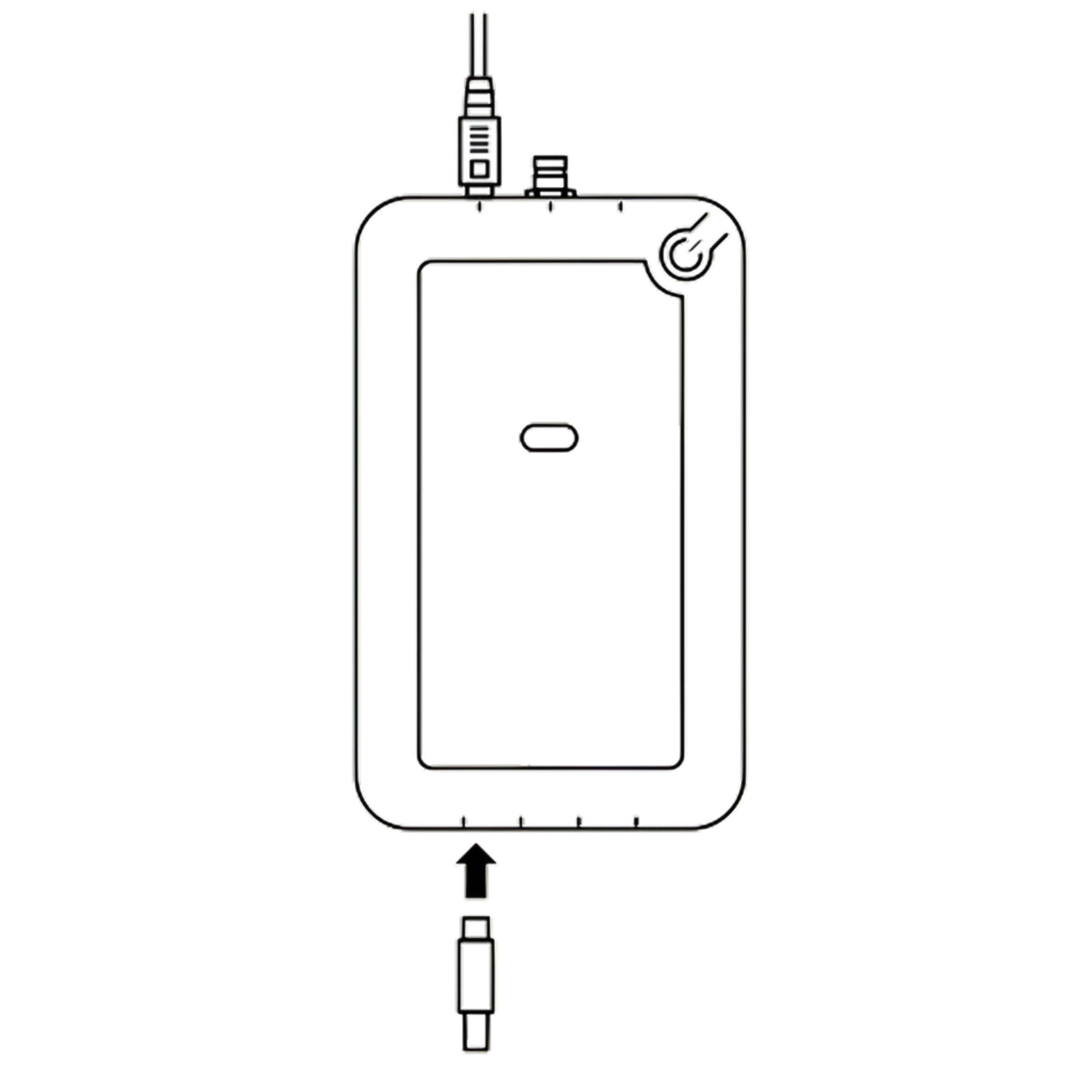
Step 2: Connect the Reader / Amplifier to the Processing Unit
Plug the 3M™ Adhesive Mix Monitor Reader / Amplifier into the port labeled 1/2 on the Processing Unit.
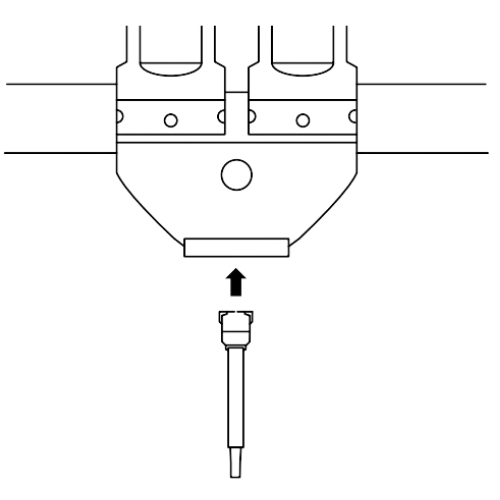
Step 3: Install the Static Mix Tip on the Adhesive Dispenser
Connect the static mix tip to the adhesive dispenser. Ensure the connection is secure and fully seated to prevent leaks during dispensing.
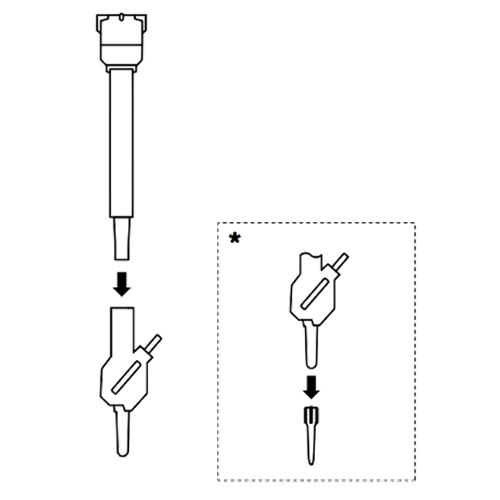
Step 4: Attach the Sensor to the Static Mix Tip
Attach the sensor to the static mix tip by screwing it in until snug. If the connection is not tight, adhesive may leak.
*Optional: A dispense tip can be connected to the outlet side of the sensor if required by your application.
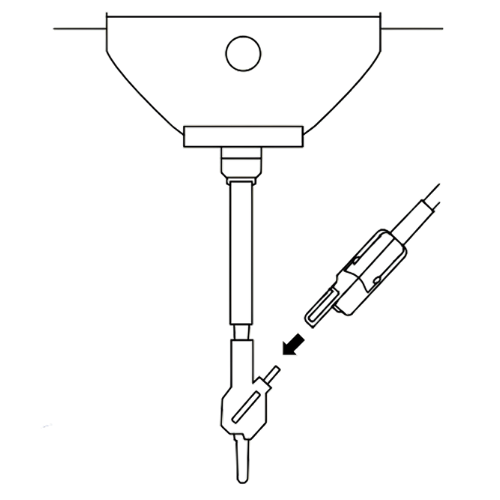
Step 5: Connect the Reader to the Sensor
Plug the reader into the side of the sensor. Ensure the connection is fully seated to maintain reliable signal transmission during dispensing.
How to Interpret the 3M™ Adhesive Mix Monitor Light Indicators
The indicator light provides immediate visual feedback on system readiness and adhesive mix quality during dispensing. Use the light status below to determine whether dispensing can proceed or corrective action is required.
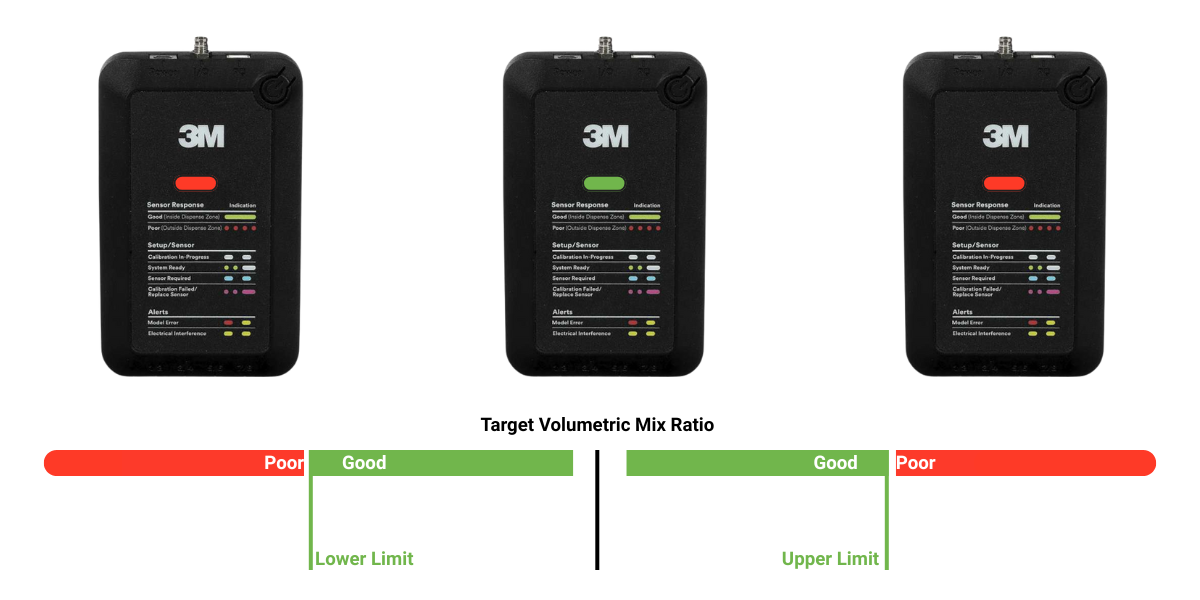
Indicator Legend
- White (System Ready): After installation and setup, a steady white light indicates the system is ready to use.
- No White Light: If the indicator does not illuminate white after setup, an error occurred during setup and the system is not ready for operation.
- Green (In Dispensing Zone): During dispensing, a steady green light indicates the adhesive mix quality is within the acceptable dispensing zone and dispensing can proceed.
- Red (Blinking, Out of Dispensing Zone): At any point during dispensing, a blinking red light indicates the adhesive mix quality is outside the acceptable dispensing zone. Dispensing should be stopped.
Corrective Action
If the indicator blinks red during dispensing, take corrective action to adjust your dispensing process before resuming operation.
How the 3M™ Adhesive Mix Monitor Interprets Sensor Response
The light indicator status is determined by comparing the real-time sensor response to predefined acceptance limits for adhesive mix quality.
How to Interpret Sensor Response
- During dispensing: Sensor response reflects the estimated volumetric mix ratio.
- After dispensing stops: Sensor response changes as the adhesive cures, reflecting cure kinetics.
Mix Ratio Representation (Base Part Fraction, BPF)
- Mix ratio is expressed as Base Part Fraction (BPF), the volumetric fraction of Part B in the total mixture.
- Example: 2:1 (B:A) corresponds to a BPF of 0.67.
The BPF for any mix ratio can be calculated using the formula:
Acceptance Limits and Dispensing Zone
- When the adhesive model is loaded, the System Manager displays the recommended mix ratio and applies default upper and lower acceptance limits.
- These limits define the dispensing zone used by the light indicator.
- Upper and lower limits can be adjusted to best fit your dispensing process.
Need guidance on setting dispense zone limits?
Refer to the technical guide for best practices on defining upper and lower acceptance limits based on volumetric ratio and purge guidance.
Considerations for defining the dispense zone →What the Sensor Response Tells You About Your Dispensing Process
The sensor response provides actionable insight into dispensing behavior at different points in the process. Interpreting this response over time helps identify off-ratio conditions, purge requirements, and process stability.
Start of Dispense
At the beginning of the dispensing process, the sensor response provides information on the current mix ratio, expressed as the base part fraction (BPF). This feedback is useful for determining how much adhesive must be purged before the correct mix ratio is achieved.
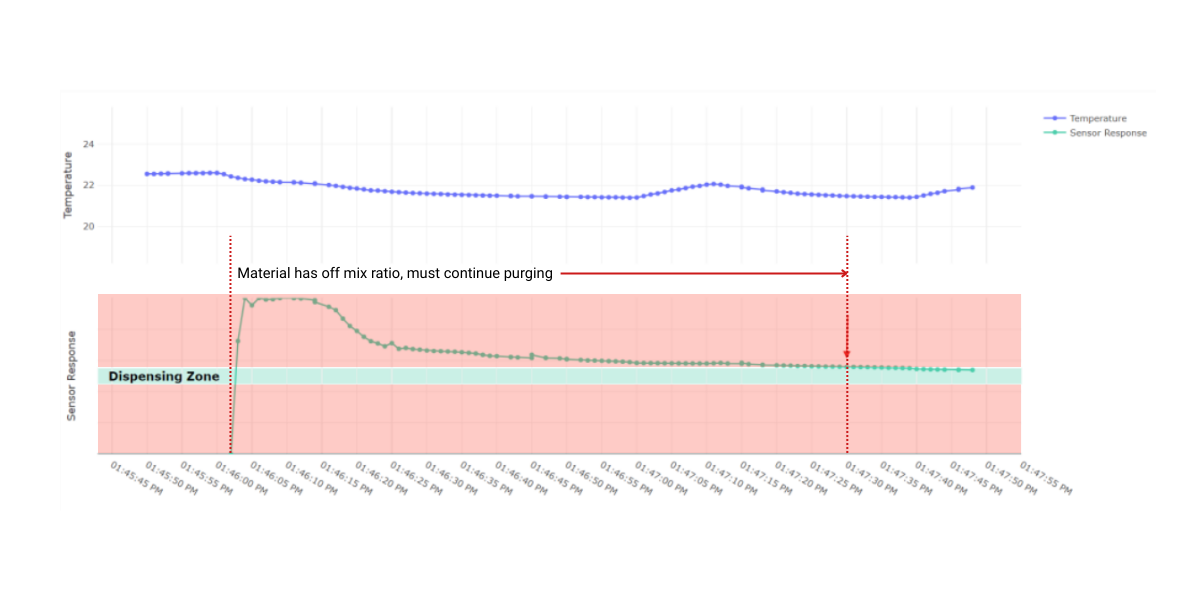
Figure illustrates a scenario where the material is initially off-ratio at the start of dispensing. In this case, continue purging the adhesive until the sensor response enters the specified dispense zone, indicating that the desired mix ratio has been achieved.
During the Dispensing Process (Continuous Dispensing Cycle)
Using the 3M™ Adhesive Mix Monitor during dispensing allows you to track adhesive mix ratio throughout the dispensing cycle. Figure below shows an example of a continuous dispensing cycle, where the sensor response is continuously monitored and the dispensed adhesive remains within the predefined dispense zone during dispensing.
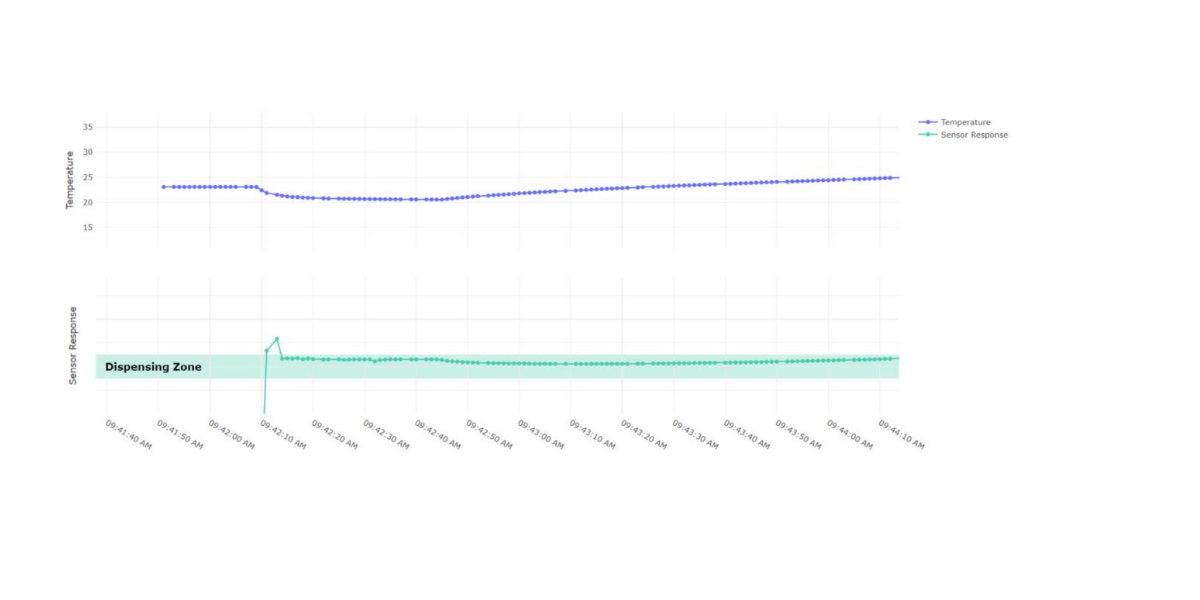
This illustrates a continuous dispensing cycle in which the sensor response remains within the predefined dispense zone. This indicates stable mix ratio control throughout the dispensing process and confirms that the adhesive being applied meets the specified mix quality requirements.
Additional Example: Sensor Response Drift During Continuous Dispensing
The 3M™ Adhesive Mix Monitor can also provide insight to help optimize your dispensing process. When using fast-curing adhesives and dispensing continuously at low flow rates, a steady increase or decrease in sensor response may be observed during dispensing.
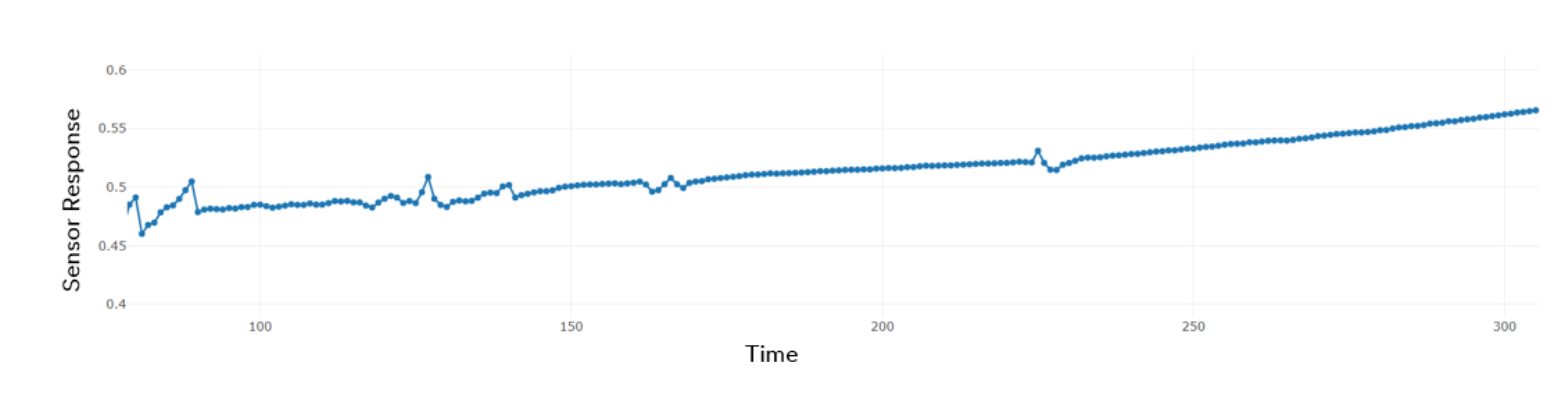
A steady increase or decrease in sensor response during continuous dispensing at lower flow rates may indicate that the adhesive is beginning to cure within the static mixer. To improve consistency and maintain stable mix quality, increasing the dispensing flow rate can help reduce in-mixer curing and stabilize the sensor response.
During the Dispensing Process (Start/Stop Dispensing Cycle)
The 3M™ Adhesive Mix Monitor provides useful insight in processes that involve multiple start/stop events, particularly when dispensing fast-curing adhesives. Each dispensing start shows up as a peak in the sensor response, making it easier to link sensor data to the specific parts being produced. When dispensing is paused, changes in sensor response (increase or decrease) may be observed as the adhesive begins to cure in the static mixer or dispensing path.
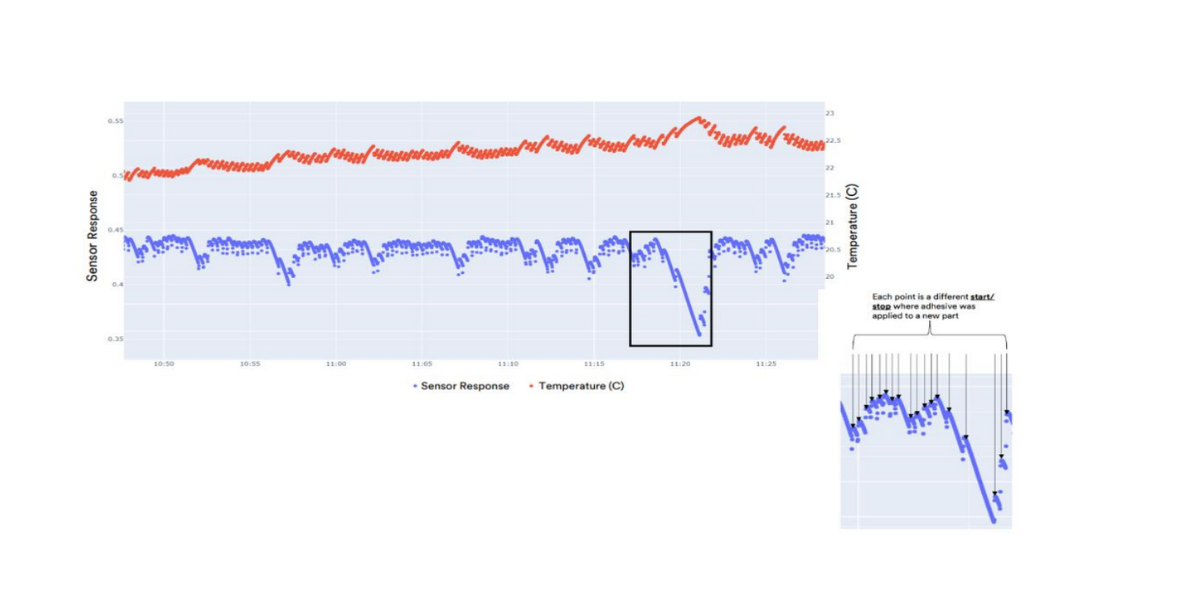
Figure shows that the fast-curing nature of the adhesive results in a decrease in sensor response and a corresponding increase in temperature when dispensing stops, indicating the onset of curing. This information can be used to guide purge decisions prior to dispensing on the next part. The zoomed-in region highlights a prolonged wait time before the next dispense cycle, which can lead to inconsistencies in adhesive application compared to earlier parts. In such cases, purging adhesive until the sensor response aligns with prior in-spec data can help restore consistency before resuming dispensing.
Best Practices for Accurate Sensor Response
- Ensure the adhesive temperature is between 15°C (59°F) and 35°C (95°F) during dispensing.
- Verify that the adhesive model loaded on the processing unit matches the adhesive being dispensed.
- Always replace the sensor at the same time as the static mixer. Do not reuse sensors.
The images shown are for visualization purposes only. No visualization software is sold or provided with the system. Customers receive the raw data stream from the device.